
Meal Voucher Management Software
Automatic calculation based on days actually worked
Every month, Kammi calculates each employee's meal vouchers from the days actually worked. Absences and public holidays are deducted, then the vouchers go to payroll and export in your provider's format.
How does the automatic calculation work?
From setup to payroll, in four steps
Initial setup
Set the face value, employer and employee shares, a monthly cap if needed, and the attendance or absence types that give the right to a voucher.
Automatic calculation
For each month and each employee, Kammi starts from the days worked and removes absences and public holidays.
Monthly review
Check the details per employee: eligible days, amount, employer and employee shares, with filters by country, company or site.
Send to payroll
Send the month’s vouchers to a payslip period, then export the sending in your provider’s format.
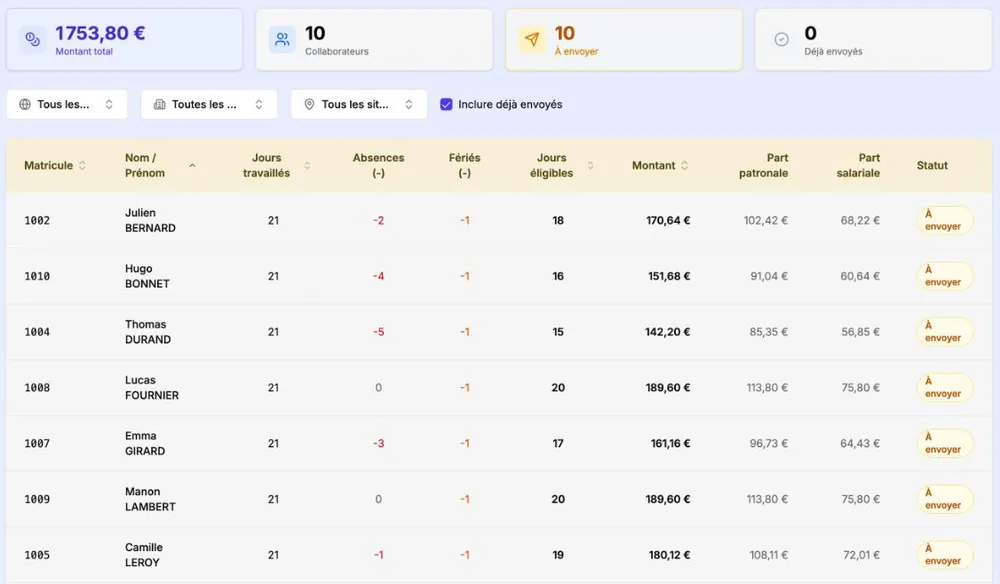
Each employee’s voucher count, calculated for you
For each employee, Kammi starts from the days scheduled in the month, then removes absences and public holidays off work. The amount, employer share and employee share are calculated line by line.
- Filters by country, company and site
- Monthly cap applied automatically
- Status of each line: to send or already sent
- Sending to payroll restricted to administrators
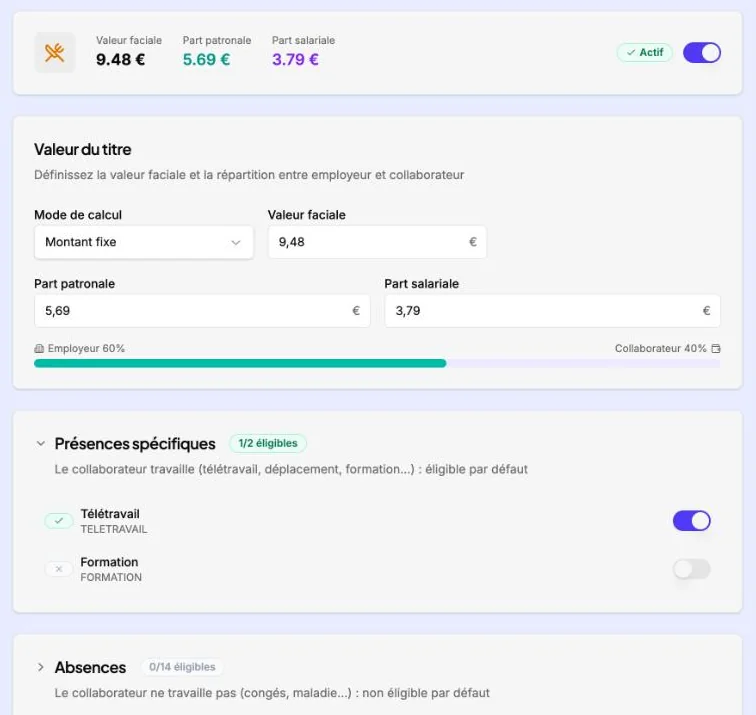
Your meal voucher policy, set up once
You set the voucher value and how it is split between employer and employee. Then you choose, type by type, which attendance and absence types give the right to a voucher.
- Fixed amount or percentage for the employer share
- Monthly voucher cap, or no cap
- Remote work, training: eligible or not, your choice
- Each absence type set separately
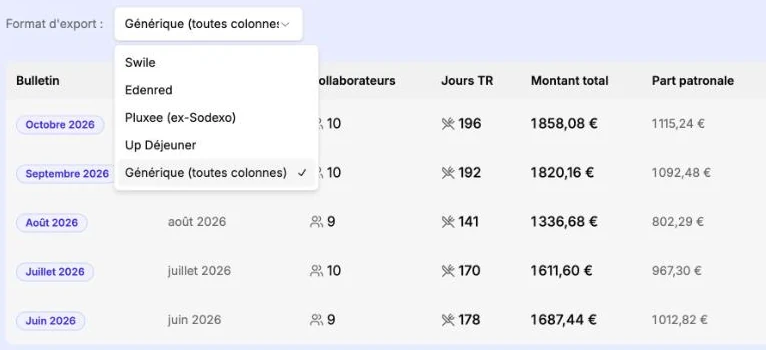
A sending history and an export per provider
Every payroll sending is kept: payslip period, number of employees, days, amounts, sender and date. The file downloads in your provider’s format.
- Swile, Edenred, Pluxee and Up Déjeuner formats
- Generic format with all columns
- One sending per payslip period, no duplicates
- Details of each sending available
Calculation rules
What Kammi counts for each day of the month, based on your settings
Day worked on site
Remote work day
Absence day (leave, sickness)
Public holiday
Above the monthly cap
Why choose Kammi for your meal vouchers?
From calculation to payroll, everything in one place
Based on actual days
Entitlements start from the days actually worked in the month, not a flat rate.
Exceptions deducted
Absences and public holidays are removed automatically. You choose which attendance and absence types give the right to a voucher.
Employer and employee shares
The split is calculated for each employee, as a fixed amount or a percentage of the face value.
Monthly cap
Set a maximum number of vouchers per month if needed: the calculation never exceeds it.
Export per provider
Each sending exports in Swile, Edenred, Pluxee or Up Déjeuner format, or in a generic format.
Sending history
Every payroll sending remains available: payslip period, employees, days, amounts, sender and date.
An export in your provider’s format
Each payroll sending exports in the format your meal voucher provider expects
Swile
Swile format export
Edenred
Edenred format export
Pluxee
Pluxee format export
Up Déjeuner
Up format export
Other provider
Generic format export
The 2026 rules in brief (France)
Kammi calculates with the face value and split you set. These settings must stay within the legal limits. Details are in our article (in French) on the 2026 meal voucher limits.
- Employer contribution exempt up to €7.32 per voucher in 2026
- Employer share between 50% and 60% of the voucher value
- One voucher per meal falling within the daily working hours
- Remote work alone does not allow excluding an employee
Frequently asked questions
Common questions about our Meal Voucher Management module.
How are meal vouchers calculated?
For each month, Kammi starts from the employee’s days worked and removes absences and public holidays. The number of eligible days, limited by the monthly cap if there is one, is multiplied by the face value, then split between employer and employee shares.
Which meal voucher providers are supported?
Each payroll sending exports in Swile, Edenred, Pluxee or Up Déjeuner format. A generic format is also available.
Does remote work give the right to meal vouchers?
Yes: in France, remote work alone does not allow an employer to exclude an employee from meal vouchers (Cour de cassation, social chamber, 8 October 2025, no. 24-12.373). The meal must still fall within the daily working hours. In Kammi, you specify which attendance types, including remote work, give the right to a voucher.
Meal vouchers are part of the module
Employee recordsSimplify your meal voucher management
See how Kammi calculates your meal vouchers and sends them to payroll every month
Request a demo