
Online Employee Handbook
Your HR rules, read and confirmed
Bring your HR rules together in a handbook organised by topic: leave, working time, remote work, benefits. Each employee reads the text that applies to them, confirms the important rules, and you know who is up to date.
How is your handbook built?
From the template to read tracking, in four steps
Start from the template
A new handbook comes with 8 categories and 17 starter sections. You choose which companies read it.
Write
You write each section, attach your documents and add a variant for an audience when the rule differs.
Publish
Each section is published as a numbered version. You preview the handbook as your employees will see it.
Track
You see who has confirmed, which sections are due for review and which figures no longer match your settings.
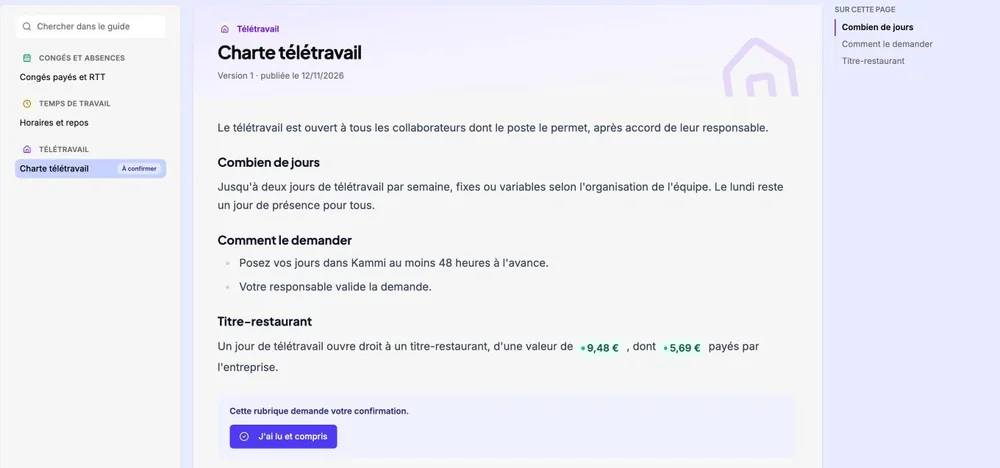
Each employee reads the rules that apply to them
The handbook is read by topic: leave, working time, remote work, benefits… Everyone reads the text for their audience, and new sections or sections to confirm are flagged.
- “New” on sections published since the last visit
- Search within the handbook and from the app’s search
- Attached files, including PDFs that can be read without downloading
- Also readable in the mobile app
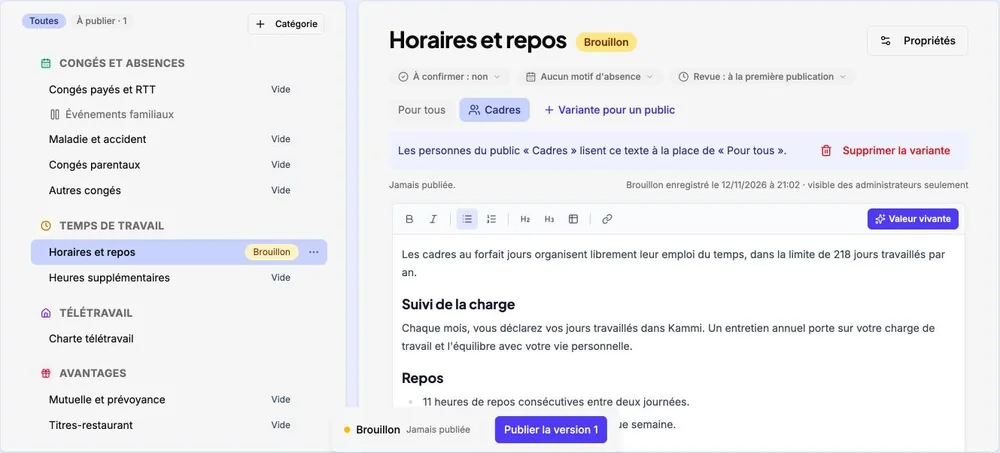
One text for everyone, and a variant for an audience
You write each section on the page, with headings, lists and tables. When a rule differs for managers, a contract type or a site, you write a variant for that audience.
- Audiences defined by status, contract, working time, length of service or site
- Draft, then “Publish version N” with the changes highlighted
- Version history, and going back to a previous version
- Values linked to your settings: they stay up to date on their own
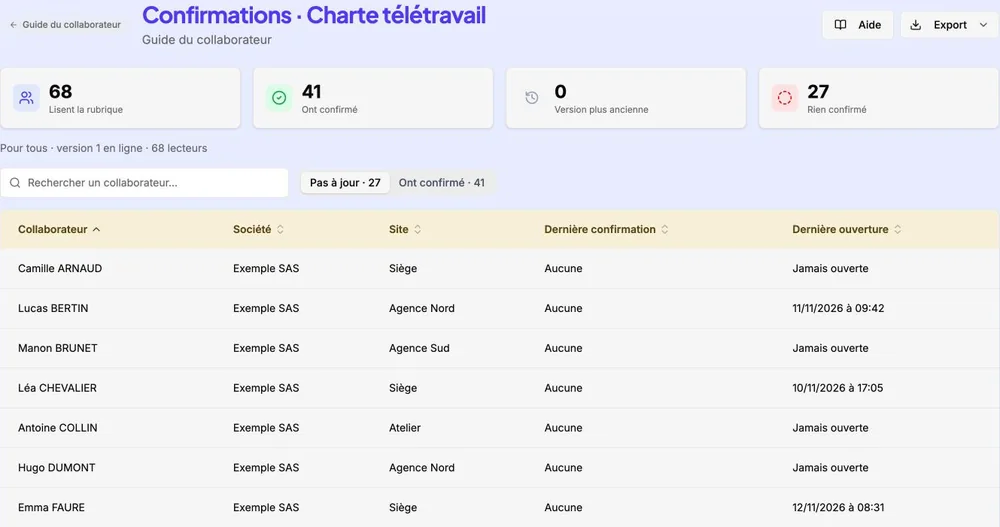
You know who has read and confirmed each rule
A section marked “To confirm” ends with the “I have read and understood” button. Kammi keeps the date, the version read and, if you ask for it, the employee’s signature.
- Who is up to date and who to follow up, section by section
- Confirmation requested again with each new version, if you want
- Signature with a finger or a mouse, section by section
- List export to CSV or Excel
A template so you do not start from scratch
Each new handbook comes with these categories and sections. You rename them, remove them or add your own.
Leave and absences
Paid leave and RTT days, family events, sickness and accident, parental leave, other leave
Working time
Hours and rest, overtime
Remote work
Remote work policy
Benefits
Health and protection insurance, meal vouchers, transport, savings and retirement
Expense reports
Business expenses
Rules and compliance
Internal rules; equality, disability, harassment
Employee representatives
Works council (CSE) and unions
Onboarding
Welcome booklet
Why choose Kammi for your employee handbook?
A handbook connected to the rest of your HRIS
Figures that stay right
Meal voucher value, days granted per family event, on-call allowances: inserted as values linked to your settings, they change with them.
The rule when it matters
Link a section to absence reasons: it appears in the request window when an employee requests an absence for that reason.
Mismatches flagged
Kammi compares figures typed in the text with your settings and flags those that differ, as well as values whose setting no longer exists.
A review date for each section
Each section has a reviewer and a review every 6, 12 or 24 months. Sections due for review are flagged in the handbook.
A booklet for temporary workers
Temporary workers read their own welcome booklet, never the employee handbook, with the same reading and confirmation features.
One handbook per company
Each company has its own handbook. To create a new one, you can copy an existing handbook and adapt it.
Frequently asked questions
Frequently asked questions about the Employee Handbook.
Do you have to write the employee handbook from scratch?
No. A new handbook comes with a template of 8 categories and 17 sections: leave and absences, working time, remote work, family events… You complete, rename or remove the sections, and add your own.
Can you prove that an employee has read a rule?
Yes, for every section marked “To confirm”. The employee clicks “I have read and understood”, with a signature if you ask for one. Kammi records the date and the version read. The “Who has confirmed?” tracking lists who is up to date and who is not, and exports to CSV or Excel.
Do temporary workers read the same handbook as employees?
No. You write a separate booklet for temporary workers. It is read, published and confirmed the same way.
The Employee Handbook is part of the suite
Intranet PortalPut your HR rules within reach of every employee
See how Kammi helps you write, publish and get your employee handbook confirmed
Request a demo